All work
Case study 04 · Enterprise · SaaS

An enterprise operations hub that pulls tasks, approvals, reports and people into one dashboard, so teams decide faster.
Role
Product Designer
Duration
2 weeks
Platform
Web application
Tools
Figma · Photoshop
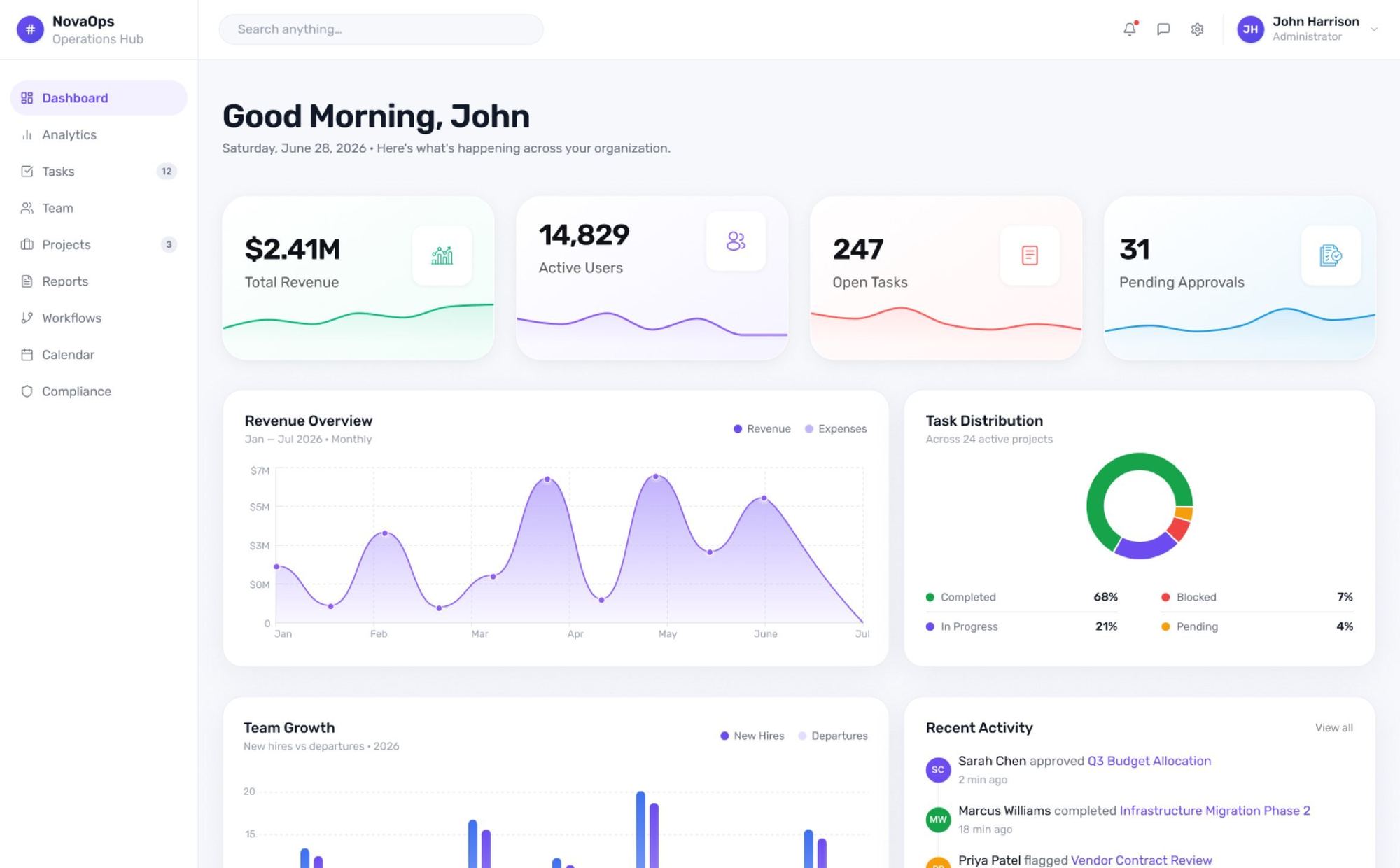
NovaOps dashboard: total revenue, active users, open tasks, pending approvals, revenue overview and task distribution
The challenge

Five systems for one job.

Organisations often run operations, workflows, reporting and user administration in disconnected systems. That means fragmented information, delayed approvals, limited visibility and slow, inefficient days.

Challenge 01

Disconnected systems

Operations, workflows, reports and users each lived in a different tool.

Challenge 02

Fragmented data

No single source of truth, so numbers rarely matched across teams.

Challenge 03

Difficult navigation

Deep, inconsistent menus made simple jobs take many clicks.

Challenge 04

Limited visibility

Managers could not see the state of operations at a glance.

Challenge 05

Slow approvals

Requests waited in inboxes with no clear owner or status.

Domain understanding

One platform for every operation.

NovaOps lets an organisation manage its operations from a single place. Hover a capability to see it light up.

Operations management
Workflow automation
Reporting & analytics
Task management
Role-based access
Notifications
Document management
Administration

Business objectives

  1. 01Centralise business operations
  2. 02Improve operational efficiency
  3. 03Reduce manual processes
  4. 04Simplify navigation
  5. 05Enable faster decision-making
  6. 06Support future business growth
Foundation

Designing with limited requirements.

The brief was light, so I set clear assumptions to guide product decisions and build a scalable foundation, including room for AI later.

Desktop-first enterprise platformMultiple user rolesSecure authenticationRole-based access controlDashboard personalisationReal-time notificationsModular architectureResponsive experienceScalable component systemFuture AI integration
User personas

Three roles, three kinds of busy.

Representative users built to understand goals, responsibilities and everyday friction inside an enterprise platform.

David

Operations Manager · 34
“I need one place to monitor operations, approvals and team performance without switching between multiple systems.”

Monitors KPIs, approves requests, tracks team output

Michael

System Administrator · 30
“Managing users and permissions should be simple, secure and consistent across the entire platform.”

Manages users, roles, permissions and settings

Sophia

Operations Executive · 27
“I want to complete my daily tasks quickly without wasting time searching for information.”

Works through tasks, updates records, submits for approval

Research & competitive analysis

Proven patterns, fewer surprises.

I compared leading enterprise platforms to find the UX patterns that work, the industry standards users expect, and the gaps worth improving.

Finding 01

Simple navigation improves productivity

Fewer levels and predictable placement let people move without thinking.

Finding 02

Dashboards must prioritise critical information

The first screen should answer "what needs me now?"

Finding 03

Role-based dashboards reduce cognitive load

Each role sees its own work, not everyone's.

Finding 04

Global search improves accessibility

One search reaches tasks, documents, users and reports.

Finding 05

Quick actions cut task-completion time

Frequent actions live one click from the dashboard.

Finding 06

Modular dashboards scale better

Widgets can be added, removed and reordered as the business grows.

Patterns adopted
  • Persistent sidebar navigation
  • Dashboard overview
  • KPI summary cards
  • Global search
  • Notification centre
Patterns avoided
  • Information overload
  • Deep navigation
  • Hidden actions
  • Complex landing pages
  • Excessive modal interactions
Information architecture

Twelve modules, never more than two clicks deep.

A persistent sidebar holds every module. Each opens straight into its most-used views, so no task is buried.

NovaOps
Operations
Tasks
  • My tasks
  • Assigned tasks
  • Completed
Workflows
  • Workflow builder
  • Automation
  • Approval flow
Projects
  • Active projects
  • Milestones
  • Resources
Reports
  • Operational
  • KPI reports
  • Export data
Analytics
  • Dashboards
  • Insights
  • Trends
Users
Approvals
Documents
Calendar
Profile
Settings
User flow

From login to done, in eight steps.

The primary journey, from secure login to a completed task and back to an updated dashboard.

  1. 01LoginSecure authentication with role-based access
  2. 02DashboardView KPIs, notifications and recent activity
  3. 03Select modulePick from the persistent sidebar
  4. 04View detailsOpen the record in context
  5. 05Perform actionApprove, edit, assign or update
  6. 06SubmitOne clear primary action
  7. 07ConfirmationInstant, visible feedback
  8. 08Updated dashboardBack to an up-to-date overview
Wireframes & UI

Structure first, then polish.

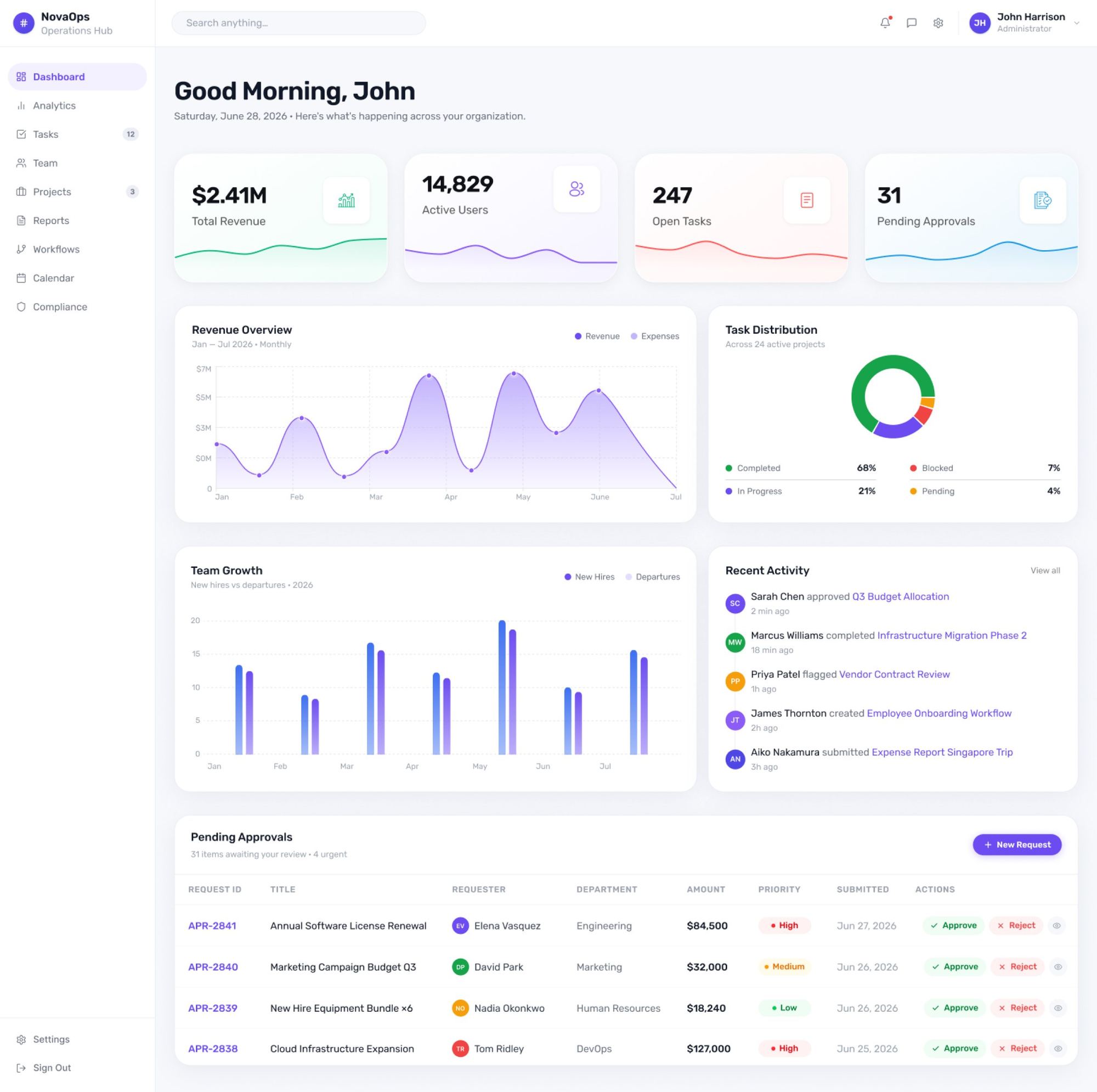
Low-fidelity wireframes validated navigation, task hierarchy and critical workflows before moving to high-fidelity UI. Pick a screen to see how it evolved.
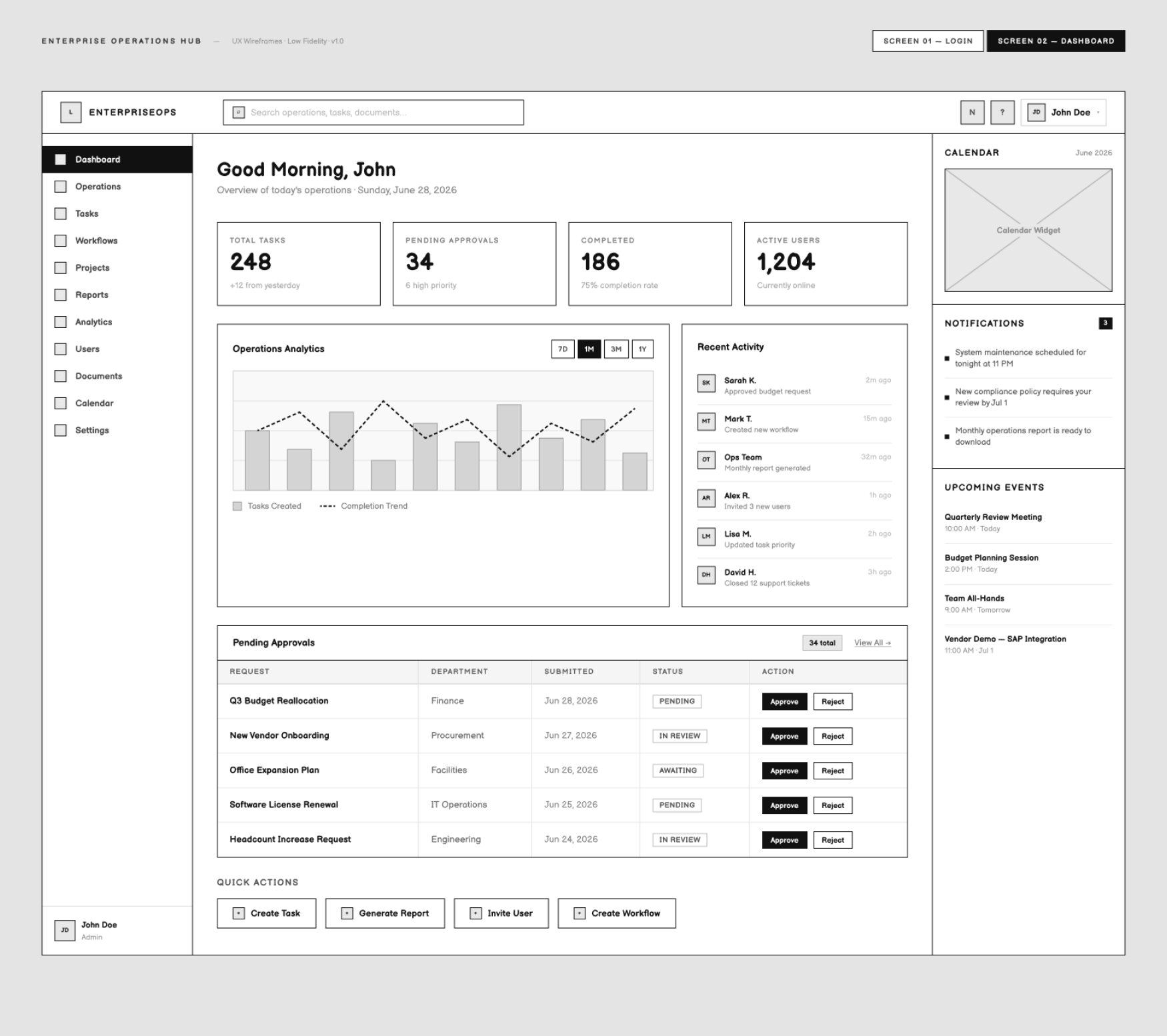
01Low-fidelity wireframe
NovaOps low-fidelity dashboard wireframe
02High-fidelity UI
NovaOps high-fidelity dashboard
UX strategy

Show less, so people do more.

Frequently used actions come first and only the most relevant information is shown. Consistent navigation, modular widgets, role-based access and a scalable component system keep the experience ready for what comes next.

Accessibility built in

WCAG AA
WCAG AA compliant colours
Keyboard navigation
Visible focus states
Accessible typography
Responsive layouts
Screen-reader friendly labels
What was delivered

From brief to handoff.

2 weeks · Web application. The main pieces of the final design:

  • Domain research and competitive analysis
  • User personas
  • Information architecture for 12 modules
  • User flows
  • Wireframes and hi-fi UI
  • UX strategy for scale

Building something similar? Tell me about it →